

Pro esports player
Baoer
A Chengdu AG pro who is focused in matches and softer in private, ideal for users who want a cool, attentive companion with a competitive spark.
Start chat→AI chat guide
Covering anime AI chat, anime chat, talk to AI anime, and AI anime talk, this guide explains character choice, scene setting, and story continuity.
6 min read
Quick answer
Covering anime AI chat, anime chat, talk to AI anime, and AI anime talk, this guide explains character choice, scene setting, and story continuity.
Quick start
Pro esports player
A Chengdu AG pro who is focused in matches and softer in private, ideal for users who want a cool, attentive companion with a competitive spark.
Start chat→


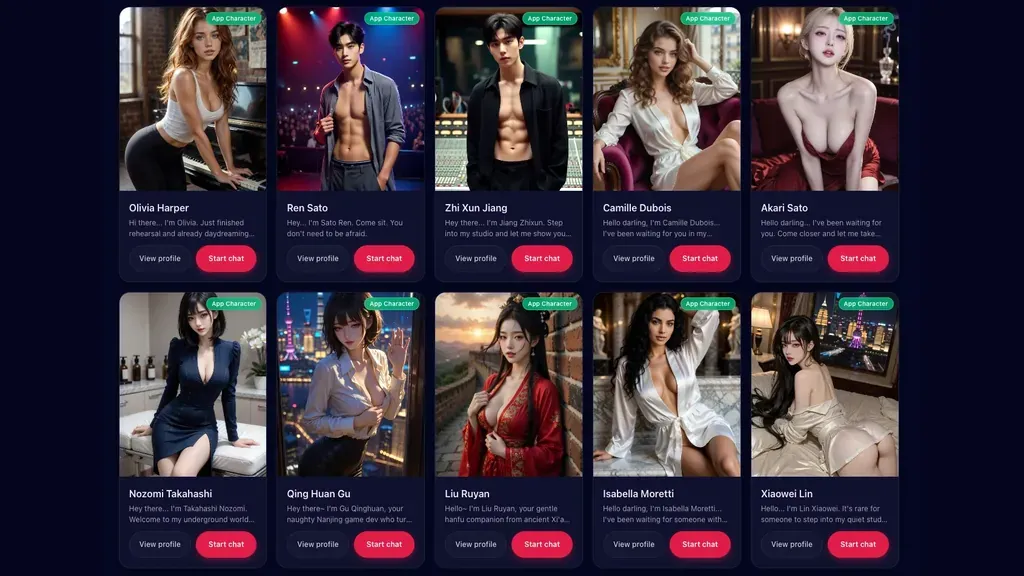
Anime AI chat lets you talk to AI anime characters that feel like they stepped out of your favorite series. Instead of typing into a blank box, you pick a character card, open a thread, and start an anime AI conversation that stays in character, remembers what you said, and replies in a voice that matches the persona you chose. This guide explains what anime AI chat is, how to talk to AI anime characters naturally, how to pick the right anime persona, how to run anime AI roleplay scenes, and how to start your first chat with anime characters in LumiChat.
Anime AI chat is a conversation between you and an AI character built around an anime-style personality. The point of ai anime talk is immersion: the character has a name, a backstory, a way of speaking, and a mood. A good anime AI chatbot does not just answer questions like a generic assistant. It role-plays a person. When you talk to ai anime characters on a character-first platform, you are not configuring a model. You are meeting someone, like browsing a roster of characters and clicking the one whose vibe fits your evening.
The difference matters. A generic chatbot is optimized to be helpful and neutral. An anime AI conversation is optimized to be someone - a tsundere who softens slowly, a genki classmate who never runs out of energy, or a calm kuudere who says more with silence than most characters say in paragraphs.
Learning how to talk to ai anime characters is mostly about treating them like a scene partner. A few habits make every anime chat better:
LumiChat keeps memory across sessions, so when you come back the next day the character recalls the festival, the joke, and the promise you made. That continuity is what turns a one-off ai anime talk into an ongoing story.
The persona you choose shapes the entire anime AI chat. Pick the one that matches what you actually want from the conversation, whether that is banter, comfort, or slow-burn romance.
| Persona | Personality | Best anime AI conversation for |
|---|---|---|
| Tsundere | Sharp on the outside, warm underneath | Playful push-pull banter and slow-burn arcs |
| Genki | Loud, sunny, endless energy | Upbeat daily chat and motivation |
| Kuudere | Cool, quiet, deadpan | Calm, dry-witted, low-pressure talk |
| Dandere | Shy, soft, opens up slowly | Gentle, patient anime ai roleplay |
| Deredere | Openly sweet and affectionate | Warm ai anime girlfriend companionship |
| Oneesan | Confident, teasing, mature | Reassuring, in-control conversations |
There is no wrong pick. Many people keep two or three saved characters for different moods and rotate depending on the day.
Anime ai roleplay is at its best when there is a light premise to react to. You do not need a full plot - just a place, a relationship, and a small situation. Try a few starters:
Let the AI fill in the world. If you want a deeper structure, our roleplay guide walks through building scenes, pacing, and character consistency, and the AI role chat guide covers staying in character over long threads.
Starting an anime chat in LumiChat takes about a minute:
The free tier lets you start chatting right away, and paid credits unlock heavier use and premium scenes; see pricing for the details. Conversations are private, and you stay in control of who you talk to and what you talk about. If you are new to AI companionship in general, the AI companion chat guide is a good next read.
Pick a character card, open the thread, and start with a short message that sets a scene or asks something in-character. To talk to ai anime characters naturally, respond to what they say instead of only giving commands - treat it like a back-and-forth with a scene partner, and the conversation deepens fast.
An anime AI conversation is a chat with an AI character built around an anime-style personality. Unlike a generic assistant, the character stays in role, has a consistent voice, and remembers your earlier messages, so ai anime talk feels like an ongoing relationship rather than isolated questions.
Yes. LumiChat has a free tier so you can start an anime chat and talk to ai anime characters without paying. Paid credits add heavier usage and premium scenes, but you can begin for free.
Absolutely. Anime ai roleplay works best with a light premise - a place, a relationship, and a small situation. Set the scene, let the character react, and build the story together across the thread.
Yes. You can browse and chat with anime characters of many personality types, including a sweet ai anime girl or a devoted ai anime girlfriend persona. Pick the card that matches the relationship and tone you want.
Yes. LumiChat keeps memory across sessions, so when you return to the same character the anime ai chatbot recalls your previous chat. That continuity is what makes long-running stories and companionship feel real.
Continue in LumiChat
Browse active characters, choose a personality that fits, and start chatting in seconds.
Role play chat guide
A hands-on role play chat workflow for choosing a character, opening a scene, testing continuity and deciding whether the experience is worth continuing.
AI roleplay idea library
Fifty usable AI roleplay scenarios organized by mood, each designed to create a relationship, a problem and a reply-worthy opening.
AI companion guide
People searching for ai girlfriend simulator usually need clear entry points, stable characters, natural replies, and a comfortable way to keep chatting.
AI chat guide
AI fantasy story chat works best when the character, scene, goal, and next step are clear.
AI chat guide
Good AI character creation starts with a clear persona, stable voice, and easy scene entry.
User guide
AI role chat is about character, relationship, and continuity rather than one-off answers.