
Pro esports player
Baoer
A Chengdu AG pro who is focused in matches and softer in private, ideal for users who want a cool, attentive companion with a competitive spark.
EsportsCoolFocused
Start chatJanitor AI proxy setup
Set up a Janitor AI proxy with OpenRouter: the exact URL, how to pick a working DeepSeek, Gemini or free model ID, free limits, and fixes for 401, 402, 404 and 429 errors.
11 min read
Quick answer
To set up a proxy on Janitor AI, create an OpenRouter API key. Then, in a Janitor chat, click the purple "using janitor" button in the header, set Provider to Proxy, click "+ New" and enter a name, the proxy URL `https://openrouter.ai/api/v1/chat/completions`, your key and a model ID you copied from OpenRouter's live model list that day. Finally click Add and refresh the page.
Featured companions
Preview a few popular companions, watch the promo video, then jump straight into chat.
Pro esports player
A Chengdu AG pro who is focused in matches and softer in private, ideal for users who want a cool, attentive companion with a competitive spark.
Osaka underground DJ
A Techno DJ from Shinsaibashi with direct energy and a strong sense of rhythm, suited to music, nightlife, and lively chat.
Ginza club queen
An elegant Tokyo Ginza club character with warm, ritual-rich replies for users who want refined emotional companionship.

Arcane mentor
A confident magic teacher for playful power dynamics, witty tests, and slow-burn classroom fantasy.

Night strategist
A cool, dangerous game-maker who suits suspenseful banter, pursuit scenes, and sharp verbal chemistry.

Savanna huntress
Bold wilderness energy for chase scenes, rivalry, and adventurous roleplay under an open sky.

Vampire countess
Gothic castle atmosphere, elegant temptation, and patient slow-burn romance with supernatural stakes.

Frost elf princess
Reserved at first, emotionally rewarding later; ideal for court intrigue and thaw-the-ice story arcs.

Luxury confidant
Polished, attentive, and direct, with a modern setting that works for date-night and power-couple scenes.

Desert stargazer
A warm tent beneath desert stars creates an intimate but story-led setting for travelers and secrets.

Nocturnal hunter
Playful hunter-and-rival energy for users who prefer suspense, reversals, and a partner who pushes back.

Gothic maid
Formal devotion and haunted-house elegance make her a fit for ritual-rich, controlled roleplay.

Onmyoji exorcist
Kyoto occult mystery, protective chemistry, and supernatural rituals give every chat an immediate plot.


Janitor AI proxy setup guide
To set up a proxy on Janitor AI, create an OpenRouter API key. Then, in a Janitor chat, click the purple "using janitor" button in the header, set Provider to Proxy, click "+ New" and enter a name, the proxy URL https://openrouter.ai/api/v1/chat/completions, your key and a model ID you copied from OpenRouter's live model list that day. Finally click Add and refresh the page.
Updated October 28, 2026. The model IDs and free limits below were checked against OpenRouter's public model list and docs on that date, and the Janitor screens were checked in Janitor's live interface the same day.
This Janitor AI proxy guide covers the setup end to end, how DeepSeek and Gemini fit in, what the free limits really are, and what each common error means. If you want Grok specifically, read the Janitor AI Grok API guide. If Janitor itself will not load, start with Janitor AI not working.
On Janitor AI, "proxy" means a model provider you choose writes the replies instead of Janitor's built-in model. Janitor still holds your characters and chats. The provider receives the prompt for each reply and, if the model is paid, bills your account for it.
OpenRouter is the most common choice because one key reaches models from many companies, including DeepSeek and Google. It is not a free unlimited AI, and it is not part of Janitor: it is a separate service with its own account, limits and privacy settings. Janitor's changelog also lists other providers that work as a proxy, such as Chutes and NanoGPT (added June 2026). The steps are similar, but the URL and model names differ.
| Item | Where it comes from | Note |
|---|---|---|
| Janitor AI account | Janitor AI | Proxy settings sit in the chat's settings panel, opened with the "using janitor" button |
| OpenRouter account | OpenRouter | Separate sign-up |
| OpenRouter API key | OpenRouter API keys page | Treat it like a password |
| Model ID | OpenRouter model list | Copy it on the day you set up |
| Credits (optional) | OpenRouter credits page | Needed for DeepSeek and Gemini; :free models work without |
Sign in to OpenRouter, open the API keys page and create a new key just for Janitor. Give it a clear name. If you plan to add credits, set a credit limit on the key so one runaway chat cannot spend your whole balance. Copy the key once and keep it private. Never paste it into a public doc, a Discord message or a "shared proxy" someone else runs.
This is where most setups break. Janitor's own quick-start article still shows the example deepseek/deepseek-chat-v3-0324:free. On October 28, 2026 that ID was not in OpenRouter's model list, so copying it leads to a "No endpoints found" error.
Open the models page on OpenRouter, search for what you want and copy the ID exactly, including the part before the slash. What the list showed on October 28, 2026:
| You want | Example IDs on the list | Free? |
|---|---|---|
| DeepSeek | deepseek/deepseek-v4.1-flash, deepseek/deepseek-v3.2, deepseek/deepseek-chat-v3-0324 | No, all paid |
| Gemini | google/gemini-3.5-flash, google/gemini-2.5-flash, google/gemini-2.5-pro | No, all paid |
| Any free model | openrouter/free, google/gemma-4-31b-it:free | Yes, with daily limits |
Free model IDs end in :free, and the free list changes often. Treat the table as an example, not a promise, and copy from the live list.
Open a chat and click the purple using janitor button in the chat header. A settings panel opens on the side with three tabs: Settings, Memory and Customize. The proxy options are on the Settings tab.
The panel shows two notices worth reading first: after you add or change a proxy URL, you must refresh the page for it to take effect, and Janitor has no affiliation with any proxies, so judge the provider yourself.
First, set Provider to Proxy. The dropdown lists five options: janitor, janitor+ Router, Proxy, OpenAI and Claude.
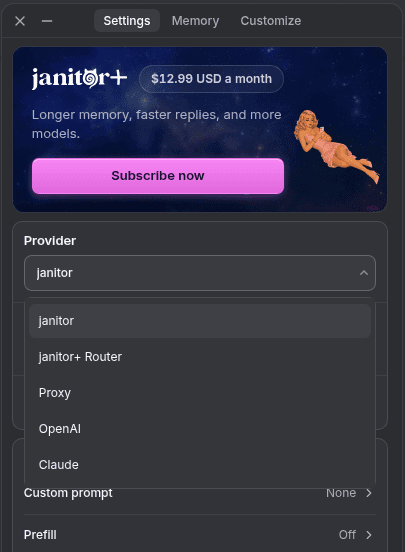 The Provider dropdown in Janitor's chat settings panel. Screenshot of Janitor's interface taken on October 28, 2026; the interface may change.
Then, under "Proxy configurations", click + New. With no saved setup, the panel says "No configurations yet" (add one or import JSON), and "+ New" opens a "New Configuration" form with these fields:
| Field | What to enter |
|---|---|
| Name | Anything you will recognise, for example "OpenRouter DeepSeek" (the field's example is My Custom Proxy) |
| Proxy URL | https://openrouter.ai/api/v1/chat/completions |
| API key | Your OpenRouter key from Step 1 |
| Model | The exact ID from Step 2 |
| Custom prompt | Leave empty at first |
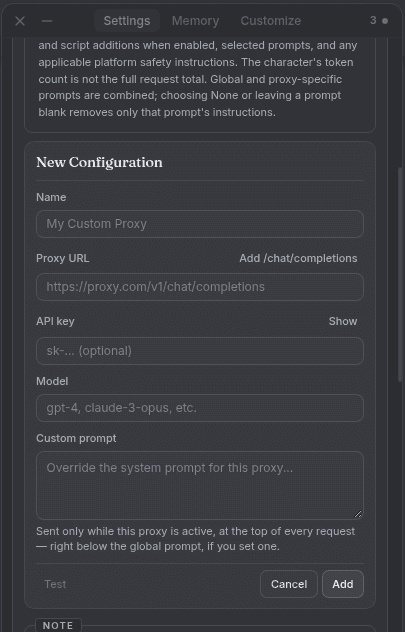 The empty "New Configuration" form. Screenshot of Janitor's interface taken on October 28, 2026; the interface may change.
The URL must be exactly that, with no extra slash and no repeated segment. If you typed only https://openrouter.ai/api/v1, the "Add /chat/completions" button next to Proxy URL appends the rest of the path. A Show button sits next to API key; use it only when nobody can see your screen. Janitor's error guide names a wrong URL as the most likely cause of a network error.
While the form is open, the panel says "Save or cancel proxy config first". Once Name, Proxy URL, API key and Model are filled in, the Test button becomes available; use it before you add the configuration. Then click Add. As Janitor's note asks, refresh the whole Janitor page, reopen the chat and send one short message to a simple character. The panel also has its own Save button at the bottom for its other settings; if your Provider choice does not stick after the refresh, save the panel and check again. Add your custom prompt, memory and long cards only after a plain message works, so you know which change broke things.
DeepSeek works through the same four steps; only the model ID changes. As of October 28, 2026 every DeepSeek model on OpenRouter is paid, so you need credits on your OpenRouter account first. Guides that promise a free Janitor AI DeepSeek proxy are usually showing an ID that has since been removed. Pick a current ID, such as a flash model for faster, cheaper replies or a larger model for long scenes, and compare them on the same ten turns before you settle.
Gemini models are also on OpenRouter, and they were also paid on October 28, 2026. Do not confuse Gemma with Gemini: Google's Gemma models have :free versions, but they are smaller open models, not Gemini. Janitor's error guide notes that models like Gemini can fail silently when a prompt trips their filters, so if Gemini returns nothing in one scene, test a neutral message before you blame the setup.
If you stay on :free models, OpenRouter's limits page listed these caps at the time of writing:
| Your OpenRouter account | Requests per minute | Requests per day |
|---|---|---|
| Bought less than 10 credits in total | 20 | 50 |
| Bought 10 credits or more | 20 | 1000 |
Janitor's guide adds two details: failed requests count toward the daily cap, and the counter resets at 00:00 UTC. In a long roleplay, 50 requests can go in one evening, because every reply, retry and swipe is a request.
Match the message you see, then apply the fix. Quoted messages come from Janitor's OpenRouter error guide; the meaning of 401 comes from OpenRouter's error docs.
| Error you see | Cause | Fix |
|---|---|---|
| 401 | The key is wrong, disabled or deleted | Create a new key, enter it in the API key field of the configuration, refresh |
| "Prompt tokens limit X > Y..." (402) | Not enough credits for this request | Add credits, or switch to a :free model |
| "No endpoints found for model name" (404) | The model ID no longer exists or is offline | Copy a current ID from the model list |
| "No allowed providers are available for the selected model" (404) | Your OpenRouter provider settings block every provider of that model | Clear Allowed Providers and unblock Ignored Providers |
| "No endpoints found matching your data policy." (404) | Your OpenRouter privacy settings rule out every provider of that model | Pick another model; Janitor's guide suggests enabling model training in OpenRouter's privacy settings, so only do that if you accept it |
| "timeout" (408) | Servers are slow or overloaded | Wait, then try again |
| "Rate limit exceeded: free-models-per-day" (429) | You hit the free daily cap | Wait for 00:00 UTC, or add credits |
| "[model] is temporarily rate-limited upstream..." (429) | The provider behind the model is busy | Try another model or a paid version |
| "Provider returned error" (502) | The model's provider failed | Check the model's uptime, try another model |
| "A network error occurred..." | Wrong proxy URL, or no refresh after adding the proxy | Re-enter the exact URL (the "Add /chat/completions" button completes the path), click Add, refresh |
An empty reply with no error is a different problem. OpenRouter's docs say a request can succeed but return no text, for example while a model is starting up, or when a reasoning model spends all of its max tokens on thinking before it writes. Raise the max tokens setting if Janitor's settings panel shows one, or switch to a non-reasoning model. If replies stop mid-sentence, the same max tokens setting is usually the cause.
A proxy adds two companies to your chat: OpenRouter and the model provider behind it. The prompt for every reply, including the character card and recent messages, goes to them. Read OpenRouter's privacy settings before you change them to fix a 404, set a credit limit on your key, and delete the key when you stop using it. Avoid public "free proxy" links run by strangers: you cannot see who logs your chats or your key.
A proxy makes sense if you enjoy choosing models and tuning prompts. If you mainly want to talk to characters without keys, credits or error codes, a hosted service is simpler. LumiChat runs the model for you in the browser, and if you have a SillyTavern character card (JSON or PNG) that you made or are allowed to use, you can import it into LumiChat. LumiChat does not import chat histories from other sites. Browse the LumiChat character library or compare options in the Janitor AI alternatives guide. If you stay on Janitor, the Advanced Prompts guide and the Chat Memory guide help once your proxy works.
Use https://openrouter.ai/api/v1/chat/completions exactly, with no extra slash.
Not on OpenRouter as of October 28, 2026: every DeepSeek model there is paid. Free models end in :free and change often.
Gemini models on OpenRouter were paid on October 28, 2026. Gemma :free models are free, but they are not Gemini.
OpenRouter's free models allow 20 requests a minute and 50 a day, or 1000 a day once you have bought at least 10 credits. Failed requests count too.
Either you hit the free daily cap or the provider behind the model is busy. The message text tells you which one.
The model ID you entered is gone or offline. Copy a current ID from OpenRouter's model list.
It is as safe as the services your chats go to. Use your own key with a credit limit, avoid public proxies, and remember that OpenRouter and the model provider receive your prompts.

Continue in LumiChat
Browse active characters, choose a personality that fits, and start chatting in seconds.
Continue the conversation naturally
Chat memory guide
A practical workflow for deciding what belongs in Chat Memory, Persona, recent history or a Lorebook—and testing whether the bot actually recalls it.
Janitor AI model setup
A current, source-checked setup workflow for using the official xAI API as a Janitor AI model route.
Status and troubleshooting
A symptom-first Janitor AI troubleshooting guide: identify the failing layer, apply the smallest fix and avoid unsafe “unblocked” shortcuts.
Nomi AI pricing guide
Nomi AI pricing is easier to understand as three layers: free 1:1 chat, a recurring subscription for premium features, and optional credits after included allowances.