
Pro esports player
Baoer
A Chengdu AG pro who is focused in matches and softer in private, ideal for users who want a cool, attentive companion with a competitive spark.
EsportsCoolFocused
Start chatRoleplay terms
OOC means out of character: a note you write as yourself, not your character. Learn IC vs OOC, how to type OOC with ((double parentheses)), and copy-ready examples for AI roleplay.
7 min read
Quick answer
OOC means "out of character." In roleplay, an OOC message is one you write as yourself, the player, instead of as your character, usually to ask a question, fix a mistake or steer the story. The common way to mark it is double parentheses, ((like this)), so everyone can tell it apart from the scene.
Featured companions
Preview a few popular companions, watch the promo video, then jump straight into chat.
Pro esports player
A Chengdu AG pro who is focused in matches and softer in private, ideal for users who want a cool, attentive companion with a competitive spark.
Osaka underground DJ
A Techno DJ from Shinsaibashi with direct energy and a strong sense of rhythm, suited to music, nightlife, and lively chat.
Ginza club queen
An elegant Tokyo Ginza club character with warm, ritual-rich replies for users who want refined emotional companionship.

Arcane mentor
A confident magic teacher for playful power dynamics, witty tests, and slow-burn classroom fantasy.

Night strategist
A cool, dangerous game-maker who suits suspenseful banter, pursuit scenes, and sharp verbal chemistry.

Savanna huntress
Bold wilderness energy for chase scenes, rivalry, and adventurous roleplay under an open sky.

Vampire countess
Gothic castle atmosphere, elegant temptation, and patient slow-burn romance with supernatural stakes.

Frost elf princess
Reserved at first, emotionally rewarding later; ideal for court intrigue and thaw-the-ice story arcs.

Luxury confidant
Polished, attentive, and direct, with a modern setting that works for date-night and power-couple scenes.

Desert stargazer
A warm tent beneath desert stars creates an intimate but story-led setting for travelers and secrets.

Nocturnal hunter
Playful hunter-and-rival energy for users who prefer suspense, reversals, and a partner who pushes back.

Gothic maid
Formal devotion and haunted-house elegance make her a fit for ritual-rich, controlled roleplay.

Onmyoji exorcist
Kyoto occult mystery, protective chemistry, and supernatural rituals give every chat an immediate plot.


OOC meaning guide
OOC means "out of character." In roleplay, an OOC message is one you write as yourself, the player, instead of as your character, usually to ask a question, fix a mistake or steer the story. The common way to mark it is double parentheses, ((like this)), so everyone can tell it apart from the scene.
Updated October 30, 2026. The definition and the double-parentheses convention were checked against roleplay community help pages, and the AI-chat advice against Janitor AI's public writing-style guide, on that date.
This OOC meaning guide explains what OOC and IC stand for, how to write an OOC note step by step, how AI characters tend to handle it, and copy-ready examples. If you are new to roleplay chat, start with the roleplay chat guide and come back here when you need to step out of a scene.
OOC stands for Out Of Character. Roleplay community help pages define it as anything meant to be read as you, the player, not as your character. Its partner term is IC, In Character: words and actions that belong to the character inside the story.
So when you type "((brb, dinner))" in a group roleplay, nobody thinks your knight suddenly mentioned dinner. The marker tells the reader to switch frames for one line and then switch back.
| IC (in character) | OOC (out of character) | |
|---|---|---|
| Who is speaking | Your character | You, the player |
| Purpose | Move the story | Talk about the story |
| Typical marker | None, or quotes and action text | ((double parentheses)) |
| Example | She draws her sword. "Stay back." | ((Can we skip to the next morning?)) |
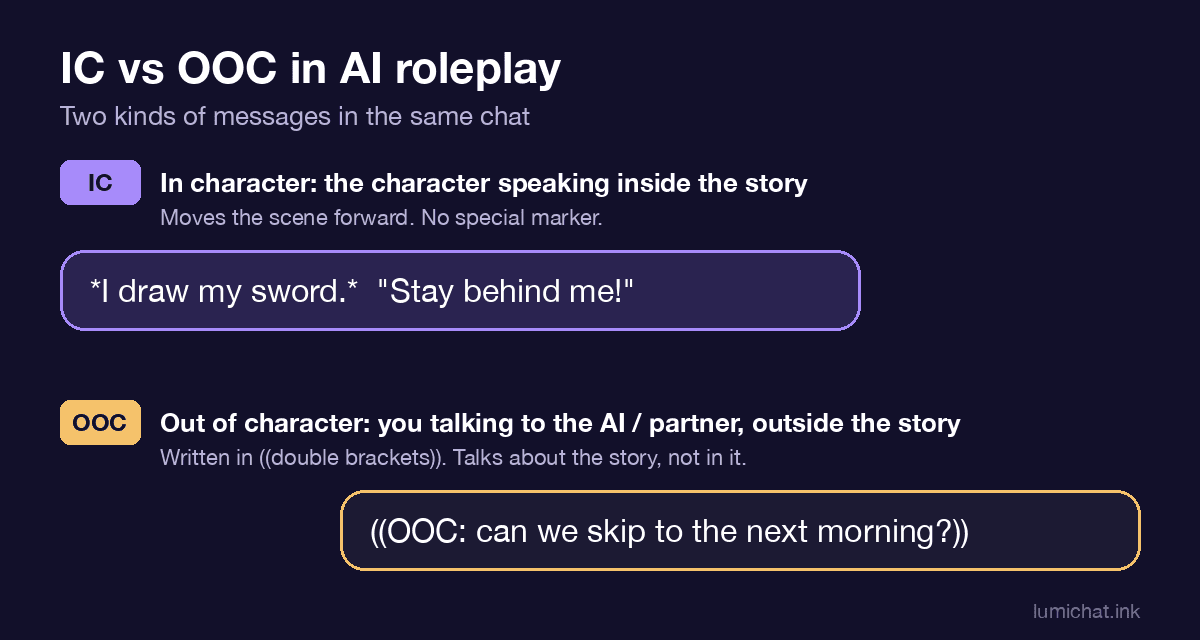 IC moves the story; OOC, written in ((double brackets)), talks about the story.
OOC comes from forum and tabletop roleplay, long before AI chat. On roleplay forums, players share one story and need a quick way to say "this part is me, not my character." Some sites even sort posts by it: one roleplay forum's help page says that posts wrapped in double parentheses are shown as OOC. Guides on separating IC and OOC give the same reason for the habit: clear signals prevent confusion and keep what the player knows apart from what the character knows.
The documented convention is double parentheses. You will also see players use a label instead. What matters is that the marker is clear and that you use the same one every time.
| Format | Example | When it fits |
|---|---|---|
| Double parentheses | ((Can we pause here?)) | The classic choice, easy to spot |
| OOC label | (OOC: Let's make the next scene calmer.) | Clear for new partners and for AI |
| Instruction tag | task: pause roleplay, answer query(...) | AI chats where a plain OOC note gets ignored |
Not every problem needs an OOC note. If the story drifted a little, you can often steer it in character: have your character change the subject, leave the room or ask a question. Step out of character when the fix cannot happen inside the story, for example when you want a time skip, a different tone, a reminder of a fact the character forgot, or a pause.
Put the whole note inside the marker, and put it at the start or end of your message, never in the middle of an action. A reader, human or AI, should be able to see at a glance where the scene stops and the note begins. If you also write an IC line in the same message, keep them on separate lines.
A good OOC note is one or two sentences with one clear request. "((Please keep replies under three paragraphs.))" works better than a long complaint about the last ten replies. Name the change you want, not only what you disliked.
After the note, give the story a clear way back in. End with an IC line, or ask your partner to continue from a named moment: "((Thanks! Let's pick up when they reach the gate.))" This keeps the OOC moment small and the roleplay moving.
An AI character reads your whole message as text, so it usually notices an OOC note, but nothing guarantees how it reacts. It may answer the note and go back to the scene, reply to it in character, or pass over it.
Janitor AI's public writing-style guide mentions the "OOC command" idea and suggests a more structured instruction instead, such as task: pause chat|roleplay, answer query(...), because a clear container is less fragile and easier to debug. That advice is written for Janitor's bots, but the reason behind it applies to most AI roleplay: the clearer the separation, the better the result. For more on structured instructions, see the Janitor AI advanced prompts guide.
These keep the request small and safe for any shared scene:
| Problem | Cause | Fix |
|---|---|---|
| The AI answers your note in character | The marker was unclear or buried mid-message | Put the note alone at the start, add an "OOC:" label |
| The AI ignores the note | The note was long or mixed with story text | One short request per note; try an instruction tag |
| The story keeps stopping | Too many OOC breaks | Steer in character first, use OOC only when needed |
| Your partner gets confused | Different markers in different messages | Pick one format and keep it |
| The character "knows" something it should not | OOC information leaked into the scene | Keep player knowledge in OOC and character knowledge in IC |
In a shared scene, OOC talk should stay short so it does not bury the story. Agree on a marker at the start, use OOC for scheduling, boundaries and questions, and take longer discussions somewhere else. When one AI plays several characters, an OOC note is also the cleanest way to say which character should speak next; the multi-character AI roleplay guide covers that setup.
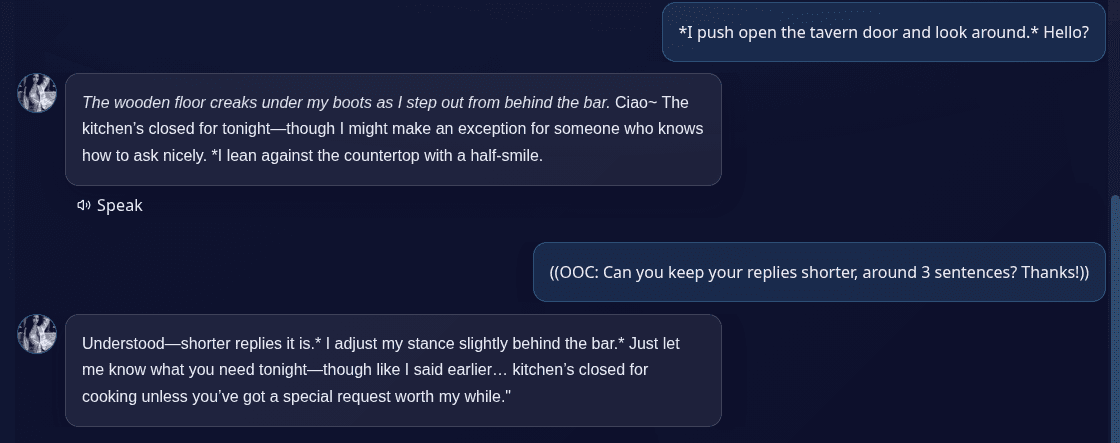 A real LumiChat chat: after a ((OOC: ...)) note asking for shorter replies, the character confirms and keeps the next reply short. Screenshot taken on LumiChat, October 30, 2026.
LumiChat has no special OOC button or command. Your note is sent with your message like any other text, and the character's AI model decides how to treat it, so the steps above apply: one short, clearly marked request at the start of the message, then a line that leads back into the scene. If a note does not land, rephrase it as a plain instruction with an "OOC:" label.
Want something to practice on? Pick a character from the LumiChat character library, try an opener from the AI roleplay ideas guide, and use the role-play prompting guide to set the scene before you ever need an OOC note.
OOC means "out of character." It marks words you write as yourself, the player, rather than as your character.
IC means "in character": anything your character says or does inside the story.
Wrap the note in double parentheses, ((like this)), or start it with "OOC:". Keep it short and put it at the start or end of your message.
Usually it notices them, because it reads your whole message, but it can still answer in character or ignore the note. A short request with a clear label works best.
No. It is a normal part of roleplay. Use it for real needs, keep it brief and go back to the scene quickly.
It is an OOC note that gives the AI an instruction, such as "summarize the story so far." Janitor AI's guide suggests a structured instruction tag for this instead.
Yes. LumiChat has no special OOC feature, so you type the note in your message; the character's model reads it like any other text.

Continue in LumiChat
Browse active characters, choose a personality that fits, and start chatting in seconds.
Multi-character roleplay ops
A practical operating system for multi-character AI chat: assign goals, lock voices, control turns and keep ensemble scenes coherent across replies.
Role play chat guide
A hands-on role play chat workflow for choosing a character, opening a scene, testing continuity and deciding whether the experience is worth continuing.
AI chat guide
A copyable six-part roleplay prompting template with examples, fixes, and a practical character-chat test.
AI chat guide
Goth AI is about characters with a dark, alternative aesthetic and a distinct personality to match.